Your growers
Adding a grower you have just found
Register a nursery that is not in the platform, from the field, and log a visit against it in the same sitting.
Where to find it
Menu My Growers + Add Grower
Before you start
The business name and its state. Everything else can follow later.
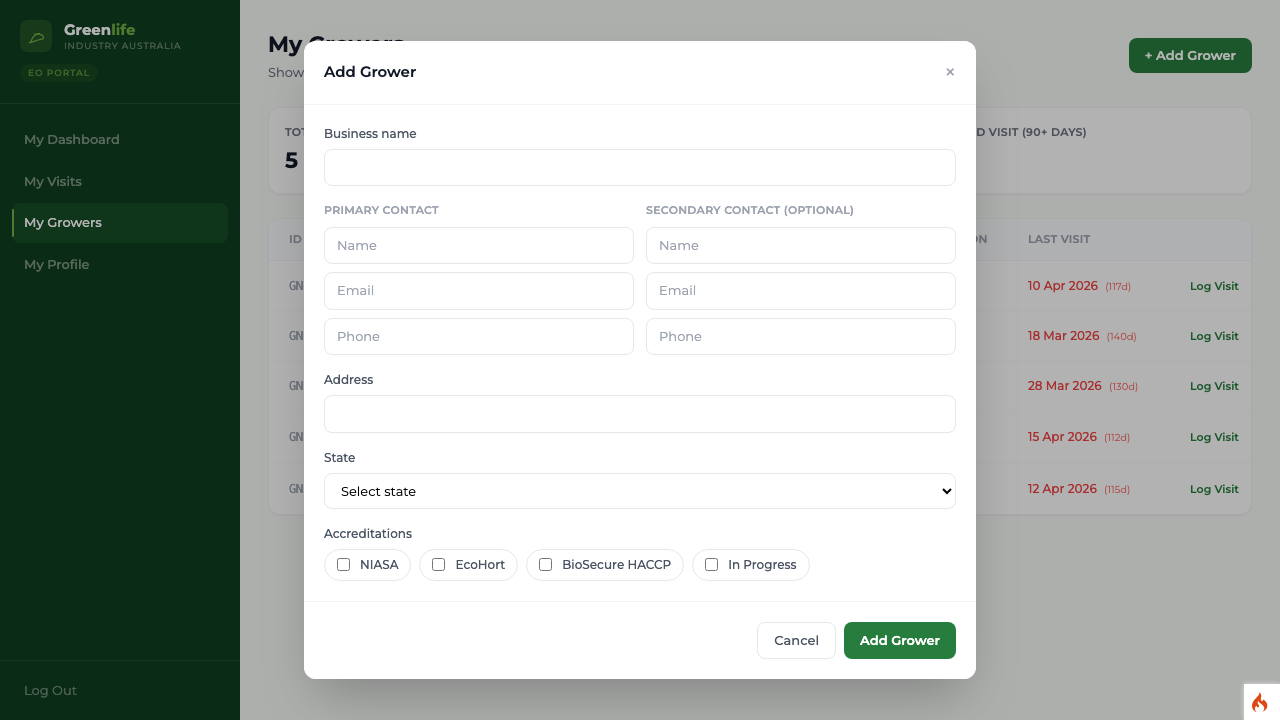
Steps
- 1 Select My Growers in the menu, then + Add Grower. You can also use Add Grower under Quick Actions on your dashboard.
- 2 Type the Business name. This is required.
- 3 Add the primary contact's name, email and phone if you have them, and a secondary contact if there is one.
- 4 Add the Address, and choose the State. The state is required.
- 5 Select any accreditations that apply: NIASA, EcoHort, BioSecure HACCP or In Progress.
- 6 Select Add Grower.
What you'll see
A confirmation reads "Grower added." and the business appears in your list with an identifier the platform generates, in the form GN-1021. It is assigned to you automatically, so you can log a visit against it straight away without leaving the flow.
Good to know
You never type the identifier and you cannot assign the business to another officer — new growers you add belong to you. If the form is rejected ("Business name and a valid state are required."), the boxes are cleared, so on a patchy connection it is worth noting the details down before you submit.