Your growers
Viewing the growers you are responsible for
Your assigned businesses, what the list tells you, and how to start a visit from it.
Where to find it
Menu My Growers
Steps
- 1 Select My Growers in the menu. The heading tells you how many you have.
- 2 Read the three figures at the top: Total Assigned, NIASA Accredited, and Need Visit (90+ days).
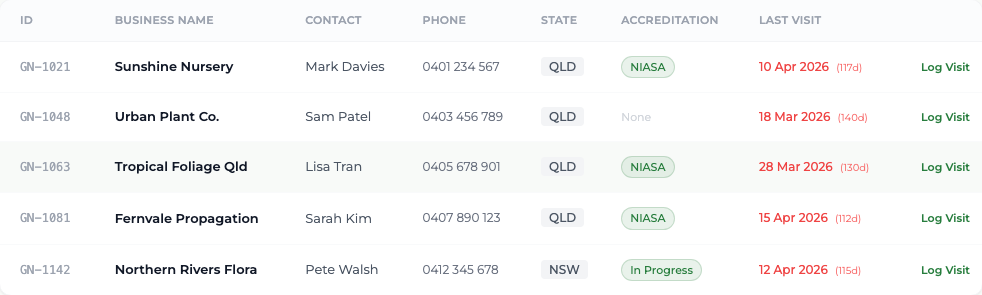
- 3 Work down the table: the GN identifier, the business name, the contact and phone, the state, any accreditation, and when it was last visited.
- 4 Select any row to open that business's record.
- 5 To go straight into logging, select Log Visit at the end of a row — the visit form opens with that grower already chosen.
What you'll see
A Last Visit shown in red with a day count, or "(no visit)", marks a business that needs attention. Those are the ones the program needs you to reach.
Good to know
There is no search box on this screen — the list is only your own growers, so it is short enough to read. On a narrow phone screen the contact, phone and state columns are hidden to keep the list readable.