Your growers
Seeing which growers need a visit
Let the portal tell you who is overdue instead of working it out yourself.
Where to find it
Menu My Dashboard Needs a Visit Soon
Steps
- 1 Select My Dashboard in the menu.
- 2 Find the Needs a Visit Soon panel. The badge on it counts how many there are.
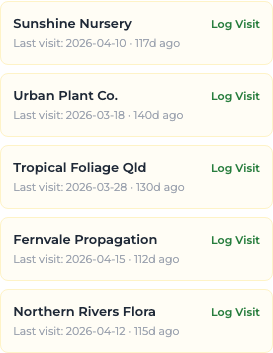
- 3 Read each entry: the business name, and either its last visit date with the number of days since, or "Never visited".
- 4 Select Log Visit on an entry to open the visit form with that grower already chosen.
- 5 For the same information as a count, check Need Visit (90+ days) on My Growers.
What you'll see
The panel lists any of your growers not visited for 90 days or more, plus any never visited at all. When there are none it reads "All growers visited recently."
Good to know
Use this alongside the calendar when you plan a run of visits — it tells you who to include so nobody is left out for a whole period.