The grower survey
Running the grower feedback survey
Hand the grower your phone for eight questions at the end of a visit.
Where to find it
after saving a visit Start Grower Survey
Before you start
A visit you have just logged. The survey belongs to that visit, so log the visit first.
Steps
- 1 On the confirmation screen after saving a visit, select Start Grower Survey.
- 2 Hand the device to the grower and explain it is eight short questions about whether GIA's support has changed anything in their business.
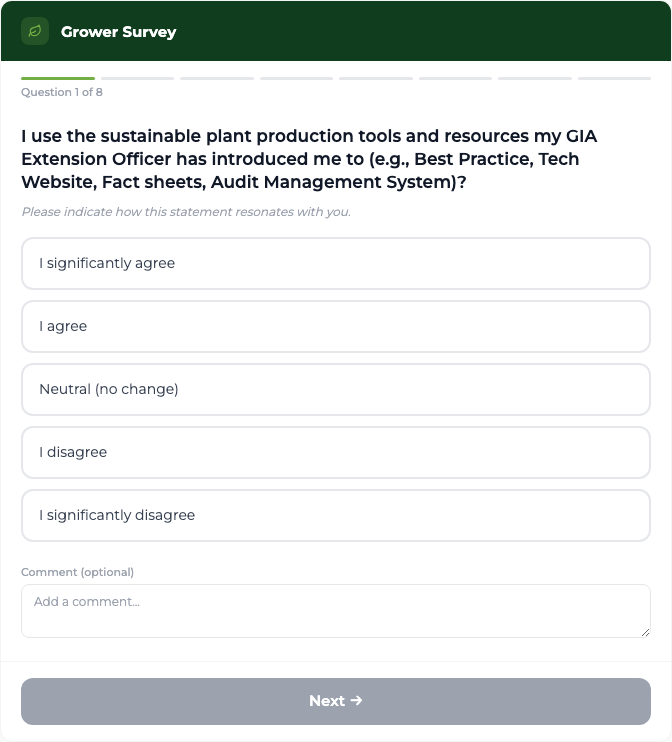
- 3 They answer one question at a time. The progress bar shows "Question 1 of 8" and so on.
- 4 For the first six questions they choose one of five answers: I significantly agree, I agree, Neutral (no change), I disagree, or I significantly disagree. Each has an optional comment box.
- 5 Question 7 asks which areas of technical support you have provided. They select all that apply — at least one is required.
- 6 Question 8 is a plain Yes or No about being contacted by GIA's Communications Team.
- 7 On the last question, select Submit Survey.
What you'll see
The grower answers in about two minutes, in wording they recognise as the questions GIA has always asked. A thank-you screen confirms it, and the answers immediately contribute to the Knowledge, Skills and Attitudes figures GIA reports on.
Good to know
Next stays greyed out until the current question is answered — so a survey cannot be submitted half-finished. Answers are held on the device only until you submit: if the browser is closed or reloaded part-way through, the survey starts again from the beginning.