Your growers
Opening a grower record and reading its history
Find out what has already happened at a nursery before you drive out to it.
Where to find it
Menu My Growers grower row
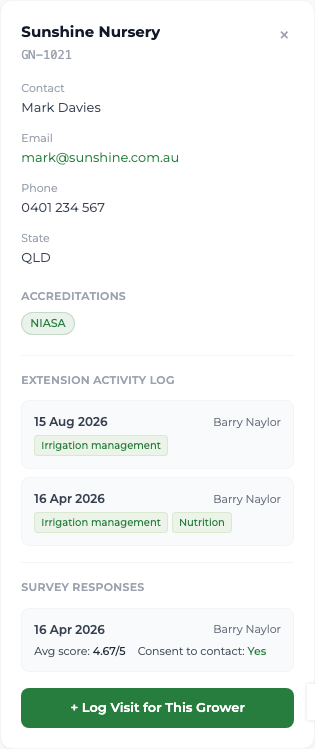
Steps
- 1 Select My Growers in the menu, then the row of the business you are interested in.
- 2 Read the contact name, email, phone, state and any accreditations.
- 3 Scroll to the Extension Activity Log. Every visit ever made to this business is listed newest first, with its date, the officer who made it, the activities delivered and the notes.
- 4 Where a survey was completed, read it under Survey Responses — the date, the officer, the average score and whether the grower agreed to be contacted.
- 5 Select + Log Visit for This Grower at the foot of the record to log a visit against it.
What you'll see
The record reads as one continuous story of GIA's engagement with the business rather than starting on the day it was assigned to you. Visits made by your predecessor are all there, still credited to them — you see the history, they keep the credit.
Good to know
Read the last two or three visits before you drive out. Turning up not knowing what was discussed last time is the fastest way to lose a grower's goodwill. You cannot edit or deactivate a grower here — ask your administrator.