Your record
Reviewing and filtering your visits
Look back over what you have logged, by grower, by activity or by date range.
Where to find it
Menu My Visits Completed
Steps
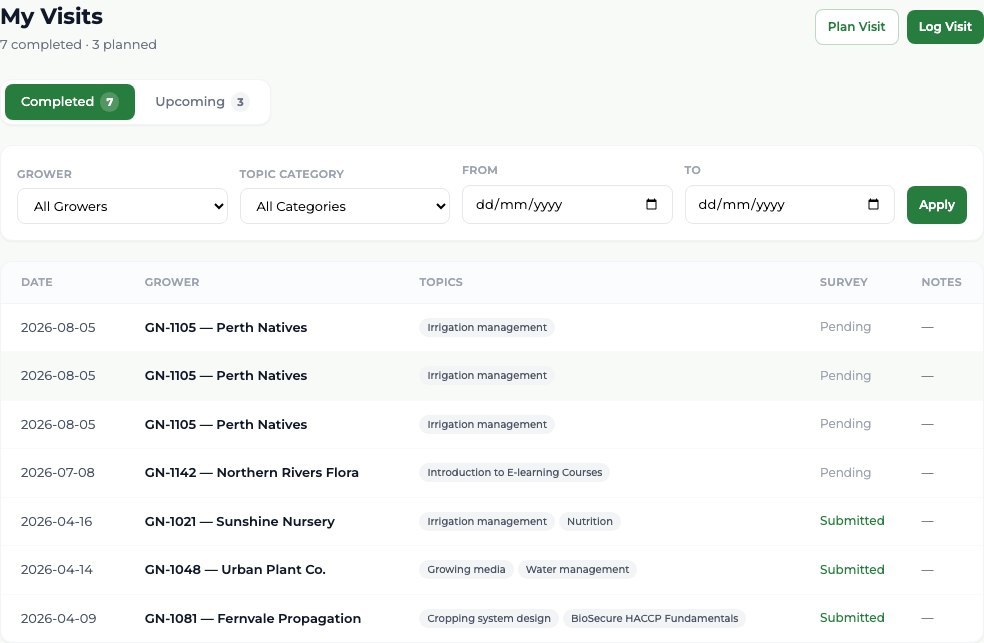
- 1 Select My Visits in the menu. It opens on the Completed tab, and the heading counts what you have completed and planned.
- 2 Choose a business in Grower, or an activity group in Topic Category, or a date range in From and To.
- 3 Select Apply.
- 4 Select Clear to drop the filters again.
- 5 For a quick look at just your last few visits, use the Recent Visits panel on your dashboard.
Each row shows the date, the grower, the activities delivered, whether the survey was Submitted or is still Pending, and the start of your notes.
What you'll see
You can reconstruct any week of work, and see at a glance which visits produced a survey and which did not.
Good to know
Rows are not clickable — there is no separate page for a completed visit, and no button to correct one. If you need a logged visit changed, tell your administrator.