Surveys and consent
Editing the wording of a survey question
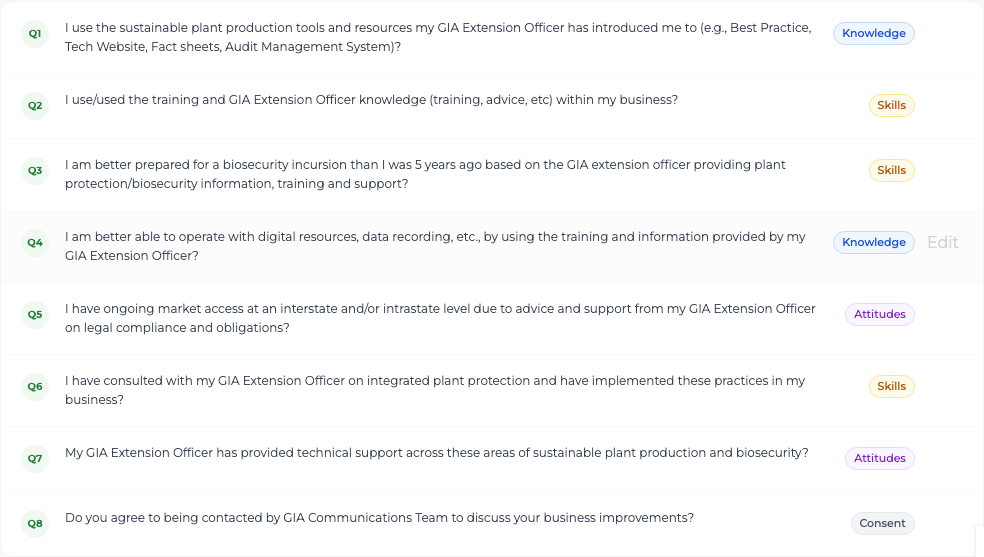
Correct the text of one of the eight grower questions, or which gauge it feeds.
Where to find it
Add /surveys/questions to the site address — no menu link yet
Before you start
The exact wording GIA wants growers to see. Growers should recognise the questions as the ones GIA has always asked.
Important
This screen has no sidebar link yet. Reach it by typing the site address followed by /surveys/questions.
Steps
- 1 Open the screen headed "Grower Survey Questions". All eight questions are listed with the gauge each one feeds.
- 2 Select Edit on the question you want to change.
- 3 Edit the Question text, and if needed change the KASA category — Knowledge, Skills, Attitudes or Consent.
- 4 Select Save Changes.
What you'll see
Officers see the new wording the next time they open a survey. Surveys already submitted keep the wording and category that were in force when the grower answered, so past results are never rewritten.
Good to know
The survey is exactly eight questions. You cannot add a ninth or remove one — only change the wording and the category of the eight that exist.