Assignments
What happens to past visits when growers move
The rules that hold when a business changes officer, and how to check they held.
Where to find it
Sidebar Growers grower row Extension Activity Log
Before you start
Before you reassign, note the grower's visit count, the program's visit total for the period, and each officer's own count.
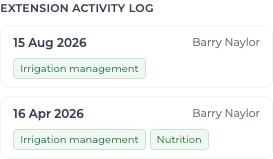
History belongs to the grower record, not to the officer. Reassigning a business is an administrative change and must never rewrite what happened at that nursery.
- Every historical visit still names the officer who made it.
- The grower keeps the same number of visits.
- The program's total for the period is unchanged.
- The original officer's own count is unchanged — they keep credit for their work.
- The receiving officer's count is unchanged — they are not credited with work they did not do.
Steps
- 1 Reassign the business.
- 2 Open the grower record and read its Extension Activity Log — each visit should still show the original officer.
- 3 Re-read the Extension visits tile on the Dashboard; it should not have moved.
- 4 Open both officers and confirm their own visit counts are unchanged.
What you'll see
The totals are identical before and after, so reporting produced last year still reproduces. Restricting the original officer's access later does not blank their name on those records either.