Administration
Keeping the activity menus up to date
Add a new Mini Tech Skills course, NIASA specification or sustainable production topic yourself.
Where to find it
Sidebar Settings Visit Services
Before you start
The exact title as it should appear to officers and in the report — the report groups deliveries by title.
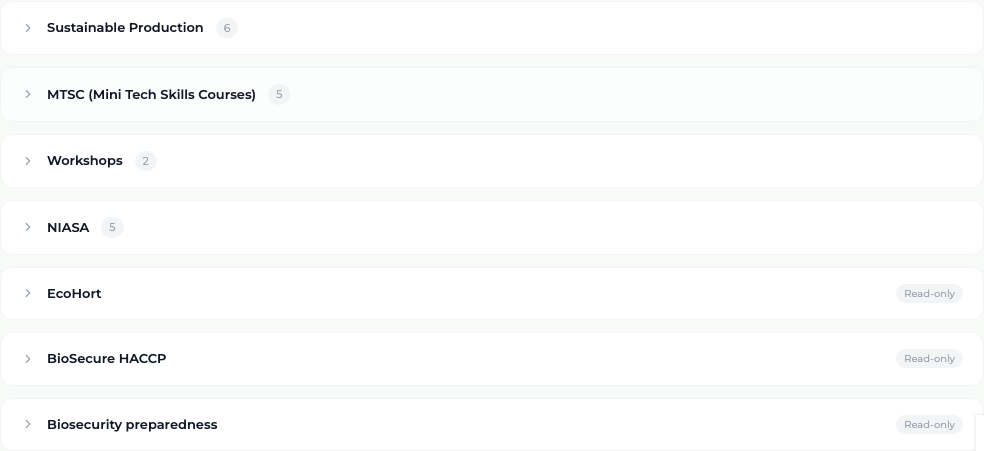
The activities an officer can select during a visit come from this screen. There are seven services. Four hold sub-items you maintain — Sustainable Production, MTSC (Mini Tech Skills Courses), Workshops and NIASA. The other three — EcoHort, BioSecure HACCP and Biosecurity preparedness — are single selections with nothing beneath them, and are marked Read-only.
Steps
- 1 Select Settings in the sidebar, then the Visit Services tab.
- 2 Select the service you are adding to. It expands to show its sub-items.
- 3 Type the new title into "Add new item..." and select + Add.
- 4 To remove a sub-item, select the small cross on its pill.
- 5 To add a whole new service, select + Add Service, give it a name, and choose whether it has sub-items or is a single selection.
What you'll see
Officers see the new item in the visit flow immediately, in the right branch — no software release is needed. A new Sustainable Production topic also becomes an option in the grower survey question about technical support areas.
Good to know
Type the title carefully. The report groups deliveries by title, so the same course entered twice with slightly different wording becomes two rows for one course. Removing an item does not damage visits that already used it.
Related topics