Reporting
Exporting the figures and the itemised activities
Three exports: the period figures as a spreadsheet, and every delivery as one row each for Appendix 2.
Where to find it
Sidebar Reports
Before you start
Choose the period in the picker first — the exports follow it.
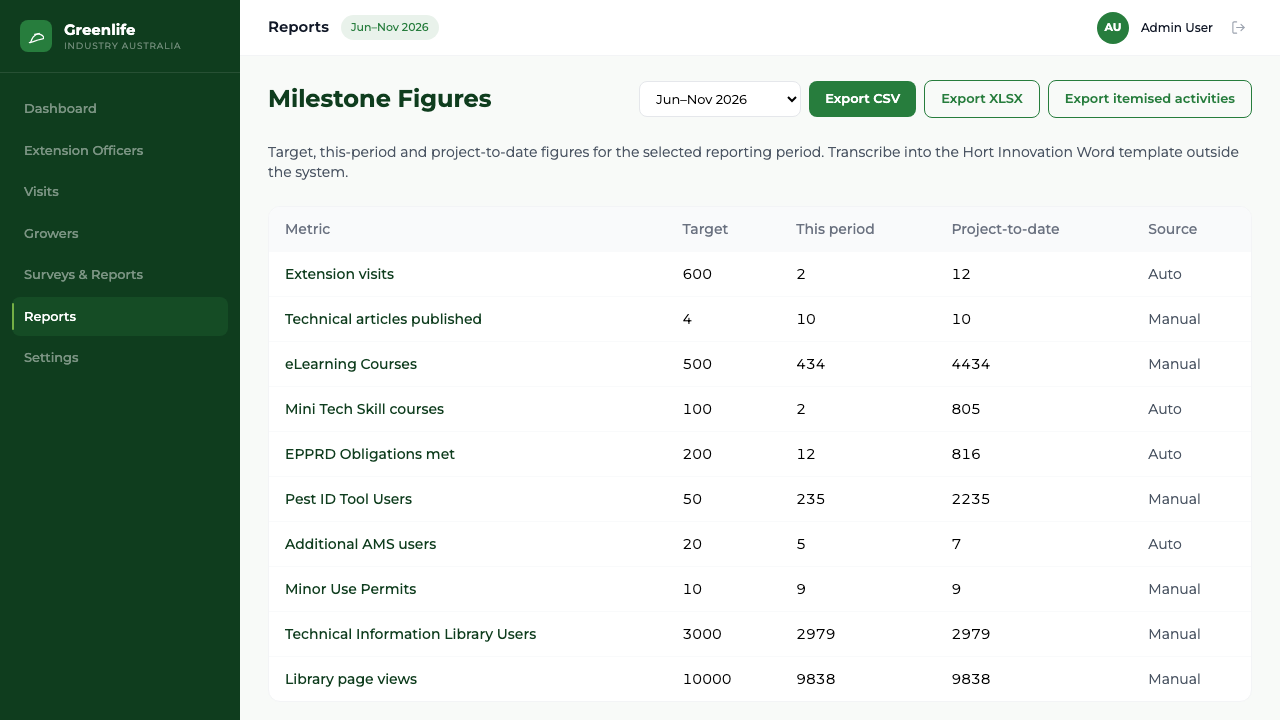
- Export CSV
- One row per metric with its label, its figure for the period and its project-to-date figure, followed by the derived aggregates. Opens in any spreadsheet program.
- Export XLSX
- The same content as a native spreadsheet file.
- Export itemised activities
- One row per activity delivered: the visit date, the state, the grower, the activity, its type and the attendee count. This is the grain Appendix 2 needs.
Steps
- 1 Select Reports in the sidebar and choose the period.
- 2 Select the export you want.
- 3 Open the downloaded file in your spreadsheet program.
What you'll see
Appendix 2 comes out of the platform as rows rather than being retyped, and the figures export is something you could attach to an email to the funder.
Good to know
Exports are spreadsheet files only — there is no PDF or Word output anywhere in the platform.