Growers
Opening a grower record and its visit history
Read everything the platform holds about one business, including every visit ever made to it.
Where to find it
Sidebar Growers grower row
Steps
- 1 Select Growers in the sidebar.
- 2 Narrow the list if you need to: type into the search box, or filter by state, accreditation, assigned officer or consent.
- 3 Select the grower's row. The detail panel opens beside the list.
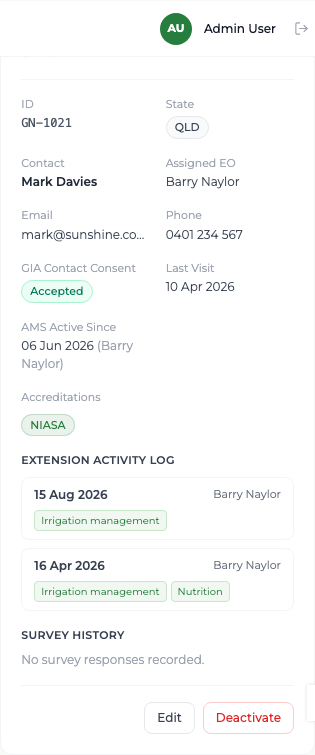
- 4 Read the identifier, state, both contacts, the assigned officer, consent to contact, the last visit date, the AMS date and the accreditations.
- 5 Scroll to the Extension Activity Log for every visit made to this business, newest first, each with its date, the officer who made it, the topics delivered and the notes.
What you'll see
The record reads as one continuous history of GIA's engagement with that business — including visits made by officers who have since left, still credited to them.
Good to know
A Last Visit date shown in red with a day count means nobody has been for a long time; "(no visit)" means nobody has been at all. The Survey History block on this panel does not populate yet — read survey results on the Surveys & Reports screen instead.